
Estimate the line. Review the real stackup.
Calculate the ideal impedance of an isolated microstrip or solve for a target trace width. The result exposes its assumptions so you can take a useful starting geometry to manufacturing engineering.
Microstrip impedance and width solver
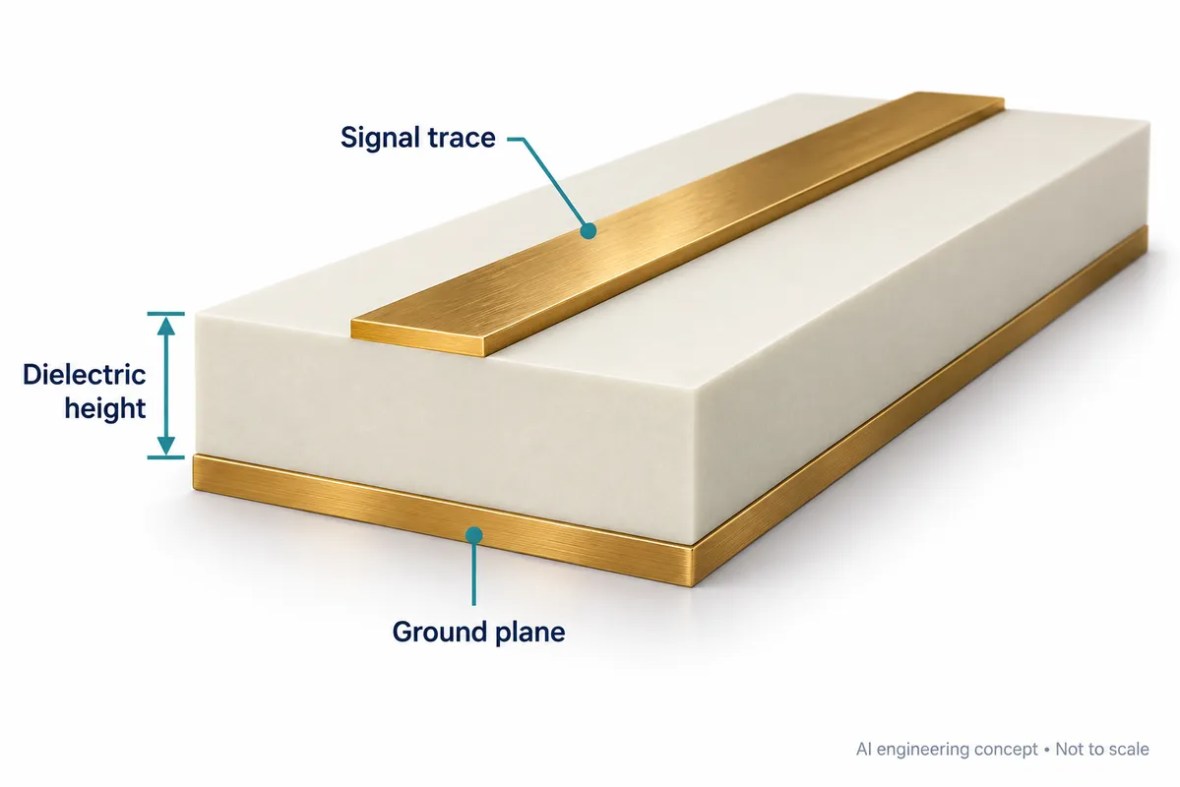
Single isolated, uncoated microstrip over an infinite reference plane. Zero conductor thickness, homogeneous dielectric and a quasi-static model. Not stripline, differential or coplanar impedance.
Hammerstad–Jensen quasi-static model, zero-thickness form. Supported W/h: 0.01–100. Width solving uses bisection within that range. The target field is used only in solve mode; the width field is used only in analyze mode.
Use the correct transmission-line model
This calculator models a single outer-layer microstrip above a reference plane. It assumes a uniform dielectric below the conductor and air above it. The conductor is treated as infinitely thin. That deliberately limited model is useful for understanding the relationship between width, dielectric height and permittivity, but it does not represent every structure called an RF trace.
Do not enter differential-pair or grounded-coplanar dimensions and interpret the result as the impedance of those structures. Adjacent conductors, top-side ground, a second reference plane, solder mask and finite copper change the field distribution. For a production routing rule, provide the actual stackup and geometry to the controlled impedance review.
Understand substrate Dk and effective permittivity
The substrate input describes the assumed dielectric material. The calculated effective permittivity describes the modeled field shared between air and dielectric. They are not the same quantity. Use a documented material model appropriate to your construction, and keep a record of the frequency and method associated with it.
The Dk/Df comparison table separates process or typical Dk from separately published design Dk. It is not a command to put one universal number into every simulation. A specific foil, thickness or material revision can require more detailed information from the supplier. The calculator uses the value you enter and does not silently choose a laminate for you.
Analysis and synthesis use the same model
In analysis mode, width and dielectric height determine the width-to-height ratio, and the model returns impedance and effective permittivity. In solve mode, the tool searches within the stated ratio limits until the calculated impedance matches the target. The displayed width is the ideal model width, not an etch-compensated production instruction.
A successful mathematical solution does not prove that the line can be fabricated with the requested tolerance. Very narrow or wide geometry can create practical constraints. Ask engineering to account for final copper thickness, etched cross-section, cured dielectric tolerance and the actual reference-plane environment. Nominal agreement is the beginning of a tolerance review.
Use estimates to ask better engineering questions
Save the input assumptions with the output. Identify the net class, layer, reference plane, mask condition, target and acceptance window. If different calculators disagree, first compare their models and units rather than averaging their answers. A solver with thickness and coating support may legitimately differ from this zero-thickness model.
The calculation is quasi-static and does not model dispersion or higher-order behavior. It also says nothing about connector launches, via stubs or the assembled network’s return loss. For those questions, review the transition model and test plan. A coupon can verify an agreed manufacturing structure, while a complete RF path needs appropriate network measurements.
Keep the engineering assumptions connected
Build the acceptance plan around the application
Decide what the bare board must demonstrate and what belongs to the assembled product. Continuity testing, an impedance coupon, a calibrated RF network measurement and an installed-system test are different forms of evidence. None should silently stand in for another. Identify the required report, coverage, limits and review responsibility before the quotation is accepted.
Record the test configuration alongside the result: board revision, material construction, fixture, calibration, firmware or device settings, temperature and the relevant operating point. When comparing prototypes, keep these conditions consistent or explain the difference. A changed connector, cable or reference plane can make an apparent board improvement difficult to interpret.
For production, agree how first-article findings become controlled manufacturing requirements. Identify which dimensions and material choices are critical, what may be adjusted by engineering, and which changes require renewed validation. A repeat order should reference the approved revision and test plan rather than rely on a previous email description.
Visit quality and test evidence for supplier qualification and reporting questions. Where a customer program requires certificates or sector-specific approval, request the actual documents and applicable scope. An application example is not a product certification or a substitute for the customer’s acceptance process.
Prepare a quotation that engineering can review
A useful RF PCB quotation starts with a controlled design package. Send Gerber or an agreed manufacturing format, NC drill data, a dimensioned outline, the board revision and a stackup drawing. Add quantity, delivery destination and the requested schedule. If some details are still open, mark them explicitly instead of letting a drawing, an email and a file name imply different requirements.
Separate mandatory requirements from preferences. A specified laminate, a customer-approved alternative and a request for a recommendation are three different purchasing instructions. State whether the supplier may propose changes to dielectric thickness, line geometry, panelization or finish, and who approves those changes. Changes that affect RF behavior should return to the design owner before release.
What affects the price?
Board area and panel utilization, quantity, material availability, stackup complexity, drilling and plating, special mechanical features, inspection and test all influence cost. Tight tolerances can also change the achievable yield and process route. An online estimate cannot account for every interaction in an unusual construction.
Use the panel and material cost tool to explore the assumptions it exposes, then request a reviewed quotation. Confirm tooling or setup charges, engineering changes, shipping, taxes and the included report package in the commercial offer.
What affects delivery?
Material stock, engineering clarification, special tooling, lamination cycles and the agreed inspection plan can affect the schedule. Assembly adds component procurement, stencil preparation, programming and fixture readiness. The requested date is a planning input until the supplier confirms the complete order scope.
The website’s response-time target describes enquiry handling. It is not a guarantee that a complex RF build can be priced, fabricated or delivered within the same period. Ask the team to identify the critical dependencies for your project.
From review to repeatable production
Agree the build
Engineering reviews material, geometry, mechanical features and test requirements. Open questions and proposed changes are documented. The approved drawing and stackup become the manufacturing baseline.
Verify the first build
Define which records are needed for the prototype: electrical test, impedance, dimensional inspection, cross-sections or an agreed RF measurement. Evaluate the evidence against the relevant acceptance criteria.
Control later changes
Keep revision, material substitutions, process changes and test updates traceable. A successful prototype is the starting point for production control, not permission to change the construction silently.
For a performance issue, retain the board revision, lot reference, measurement setup and operating conditions. Comparing repeatable measurements is more useful than comparing screenshots taken with different fixtures or calibration. Define the investigation and disposition with the supplier using the actual order requirements.
Prepare an engineering review from this resource
Select what is ready. This checklist runs locally and does not upload files or place an order.
From an online result to a manufactured board
RFPCB and PCBSync share a manufacturing operation. The photographs below show real process and laboratory areas from that facility archive. An online calculation is an engineering aid; a quotation and acceptance plan still need the actual design package.



PCB Impedance Calculator — Microstrip & Width Solver: common questions
Does this calculate differential or coplanar impedance?
No. It models only an isolated, uncoated microstrip with zero conductor thickness.
Why is copper thickness not an input?
This version deliberately uses the zero-thickness model. Production geometry needs a model and review that include finite copper and the etched profile.
Can I manufacture the solved width directly?
Treat it as a starting estimate. Confirm the actual stackup, compensation, tolerance and test method with engineering.
Related RF design resources
PCB Impedance Calculator — Microstrip & Width Solver · RF PCB Insertion Loss Calculator & Budget · RF PCB Dk / Df Comparison Table · RF PCB Material Cross-Reference & Candidate Tool · RF PCB Stackup Library — 2, 4, 6 & 8 Layers · RF PCB Design Guide & Review Checklist
Continue with controlled impedance manufacturing, hybrid stackup review or a project enquiry when your assumptions are ready for engineering review.
Model and data sources
Sources reviewed September 2026. Original supplier documents control their stated values and conditions. Educational stackups and calculations are not manufacturing approvals. The page explains the model scope rather than claiming full-wave accuracy or material equivalence.
Send the assumptions with the design.
Include the model, material source, stackup, geometry and acceptance needs. The engineering team can review open questions and confirm a quotation scope.
Ready for a quotation?
Send your requirements for a material, stackup and manufacturing review. Price and schedule are confirmed for your project.