
RF material selection / interactive engineering workspace
Rogers RO4003C PCB is a practical option for low-loss RF circuits when a UL 94 V-0 laminate rating is not required. Explore material data, solve a target microstrip width, budget a hybrid stackup and compare transparent cost scenarios before sending fabrication files.
Built for engineers comparing constructions and buyers preparing a clear RFQ. Every calculator states its assumptions; a production quotation follows engineering review.
What is a Rogers RO4003C PCB?
A Rogers RO4003C PCB uses a glass-reinforced hydrocarbon/ceramic laminate for its specified RF dielectric layers. It is a thermoset material, not a PTFE substrate. The name can describe a two-layer board with one RF core or a multilayer assembly that combines RO4003C with other approved dielectric materials. Always identify the actual layers that require RO4003C; a purchase order saying only “Rogers board” leaves too much room for interpretation.
The material is commonly considered for impedance-controlled transmission lines, RF matching networks, filters and antenna feed structures. The engineering objective is predictable electrical behavior in a construction that can be fabricated consistently. That does not make the laminate a guarantee of insertion loss, antenna gain or production yield. Those outcomes depend on the circuit, copper, transitions, assembly and measurement conditions as well as the dielectric.

RO4003C specifications, Dk and thickness options
The following reference values come from Rogers product information and its RO4000-series datasheet. Typical material properties are not finished-board acceptance limits. Check the applicable datasheet revision and purchase specification for the exact product, foil and thickness you intend to order.
| Property | RO4003C reference | Engineering implication |
|---|---|---|
| Process Dk | 3.38 ± 0.05 at 10 GHz / 23°C | Material characterization reference, not effective microstrip Dk. |
| Design Dk | 3.55 | Starting point for the design model; validate against the actual construction. |
| Typical Df | 0.0027 at 10 GHz / 23°C | Dielectric loss only; conductor and transition losses also matter. |
| Thermal conductivity | 0.71 W/m·K | One input to a full thermal model. |
| Flammability | Not UL 94 V-0 rated | Resolve the product’s flame-rating requirement before selection. |
Published nominal dielectric thicknesses include 0.203, 0.305, 0.406, 0.508, 0.813 and 1.524 mm (8, 12, 16, 20, 32 and 60 mil). These are material options, not a live inventory promise. Copper and subsequent processing affect finished board thickness. Ask for the available foil weight and the tolerance associated with the selected core.
Sources: Rogers RO4003C product information and RO4000 laminate datasheet.
Rogers RO4003C PCB cost: build a transparent budget
A useful early cost estimate explains what it includes. The tool below separates full-panel material allocation, fabrication, testing and one-time setup. All initial rates are editable examples, not current factory prices. Replace them with assumptions agreed with your supplier to compare board dimensions, panel layout and quantity without hiding the setup charge inside an unexplained unit price.
RO4003C budget & panel calculator
Editable example assumptions. USD. Not a factory price list.
How this cost calculator works
The layout model compares uniform board orientations at zero and ninety degrees and uses the larger count. Enter the usable panel dimensions after rails and reserved areas are removed. It does not perform mixed-orientation nesting or decide coupon locations. The gap represents board-to-board separation; the factory must confirm routing, scoring, tooling and assembly constraints before the count becomes a production plan.
Required panels are rounded upward after the expected-yield allowance. Material is charged per full panel. Fabrication is applied to all board positions started on those panels, while testing is applied to the ordered quantity. Setup is added once. The displayed unit amount is the complete modeled total divided by ordered boards. Expected yield is a planning assumption, not a statistical guarantee that every order will produce that many acceptable units.

The model deliberately leaves finish, shipping, tax, assembly and specialized RF testing for a reviewed quotation. If a supplier includes these items in a fabrication rate, record that assumption to prevent double counting. A hybrid board may use less RF laminate, but added processing or inspection can offset the saving. Compare the complete manufacturing route instead of applying a fixed percentage reduction to material price.
For sourcing, request prototype and repeat-order quantities against the same file revision. Ask whether setup is charged again, whether material is allocated to the whole panel, and how delivery and testing are priced. These questions make quotations easier to compare. Use the RF PCB quote form when you are ready to replace a planning scenario with a reviewed offer.
RO4003C impedance calculator and 50 Ω trace-width solver
Choose a target impedance to estimate a starting trace width, or switch modes to analyze an existing line. The default dielectric constant is the published design value, 3.55. Dielectric height means the distance from the signal trace to its reference ground plane, not the overall board thickness. The result also reports effective dielectric constant, delay and guided wavelength with explicit units.

Microstrip impedance & target-width solver
RO4003C design Dk preset: 3.55. Dimensions in millimetres.
Model scope and interpretation
This tool uses the quasi-static Hammerstad–Jensen microstrip model with zero conductor thickness, as documented in the Qucs microstrip technical reference. Target-width mode solves the same model numerically. The supported width-to-height ratio is 0.01 to 100 and Dk range is 1 to 20. This is an isolated, uncoated microstrip approximation; it does not model a coplanar ground gap, stripline, differential pair, solder mask or conductor roughness.
Frequency is used to calculate wavelength. It does not introduce a frequency-dependent material model or dispersion correction into the impedance estimate. Propagation delay is reported in picoseconds per millimetre; total line delay is reported in nanoseconds. Do not confuse those units or treat a quarter-wavelength value as a complete resonator design. End effects, launches and surrounding metal may change the practical electrical length.
For production, specify the target impedance, allowed tolerance, relevant nets and layers, then request a fabricator-confirmed geometry. Final copper thickness and etched trace shape can shift the result. Agree on whether line-width changes require design approval and what coupon or measurement demonstrates acceptance. A straight-line impedance result does not validate a connector launch or prove an insertion-loss budget across a complete RF path.
RO4003C stackup design: two-layer and hybrid boards
A two-layer concept places the RF signal above a single RO4003C core with a continuous ground reference on the opposite copper layer. This gives a straightforward starting geometry for the microstrip solver. A multilayer hybrid can retain a dedicated RF dielectric while using an approved FR-4 build for other functions. The reference plane must remain intentional and uninterrupted beneath the sensitive signal path.
Nominal stackup thickness planner
Separate RF dielectric, other dielectrics and copper.
The thickness planner adds total RO4003C dielectric, all other pressed dielectrics and the selected copper contribution. It assumes equal copper thickness on each layer. For a multilayer, include every core and bonding layer exactly once. For a two-layer board, the other dielectric contribution is zero. Surface finish and solder mask are excluded. This arithmetic check helps find omissions; it does not establish dielectric balance, lamination compatibility or a finished-thickness tolerance.

What belongs in the approved stackup?
Record each copper layer’s role, each dielectric product and pressed thickness, and the foil requirements. Add overall thickness and tolerances, impedance targets, bonding materials and any restrictions on substitutions. If the layout depends on a particular core, identify it directly rather than leaving the manufacturer to infer it from the finished thickness. Keep the approved stackup revision with the fabrication release and purchasing package.
RO4003C can be processed using established epoxy/glass fabrication techniques, but a specific hybrid construction still needs a qualified manufacturing route. Do not copy a generic press recipe from a material guide into an order. The bonding system and board architecture determine the appropriate process. Ask the fabricator to review drill features, aspect ratios, copper distribution and thermal requirements before releasing production files.
RO4003C vs RO4350B: which PCB material fits?
Start with flame-rating requirements and the electrical budget, then compare the actual manufacturing constructions. RO4003C has a lower published typical Df than RO4350B under the same 10 GHz reference condition. That does not imply an identical percentage improvement in complete-board loss. Copper, line dimensions, roughness, radiation and interconnects also contribute. Evaluate the full path before changing a validated design.
| Decision | RO4003C | RO4350B |
|---|---|---|
| Published design Dk | 3.55 | 3.66 |
| Typical Df at 10 GHz | 0.0027 | 0.0037 |
| Standard laminate UL 94 V-0 | No | Yes; verify exact grade and construction |
| Selection question | Does the loss budget favor this material, with no V-0 requirement? | Does the application require the rated alternative? |
| Substitution review | Recheck geometry, material model, bonding, availability and qualification. | |
See the RO4350B material, cost and design guide for the alternative’s specifications and planning tools. Keep the target impedance and required performance constant when comparing materials. Reusing one trace width with a different dielectric model can make an apparently direct comparison misleading.
FR-4 may remain appropriate for short or less demanding paths, depending on its exact grade and the circuit requirements. There is no universal frequency boundary that forces every design to change laminate. Instead, define permitted loss, phase error, temperature range and manufacturing variability. For particularly demanding microwave paths, compare candidate constructions using validated simulation and representative measurements.
Applications, finish and manufacturing evidence
For antenna feeds and RF filters, concentrate on repeatable geometry and the installed environment. A successful bare-board simulation can change when the connector, enclosure and mounting hardware are introduced. Plan the prototype around those conditions. Specify what will actually be measured—return loss, transmission loss, impedance or antenna performance—and avoid treating one measurement as a substitute for all the others.
For amplifier and mixed RF/digital boards, examine grounding and heat removal alongside the signal path. Copper planes, thermal vias and mechanical interfaces may dominate thermal behavior. Material thermal conductivity is only one input. Review solder-mask coverage, exposed contact areas and finish selection against both electrical and assembly requirements; there is no universally best finish for every RF circuit.

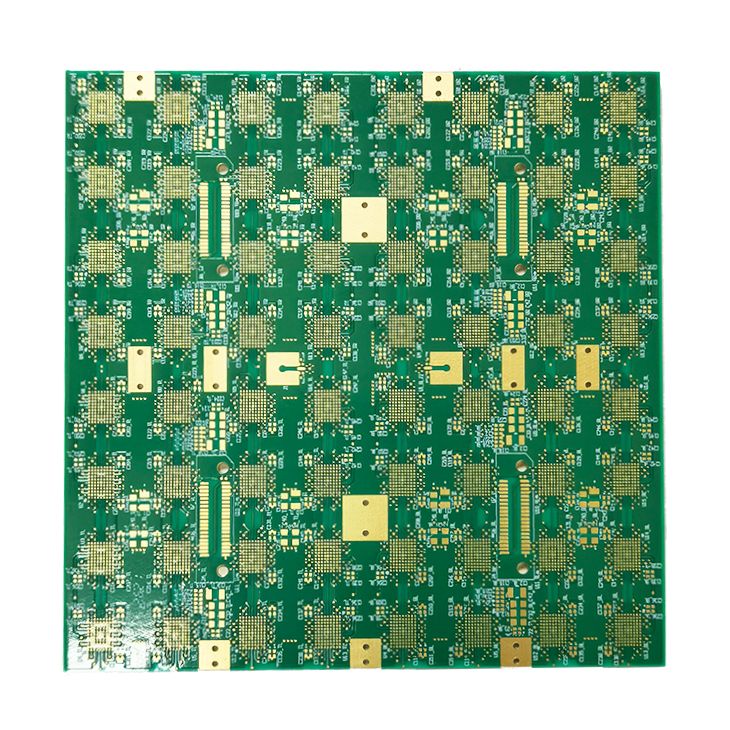
When selecting a manufacturing partner, request material traceability, a reviewed stackup and the inspection evidence your application needs. Identify which reports are included and which require separate agreement. A photograph can show workmanship or layout features, but it cannot prove the laminate identity, impedance tolerance or reliability of a future batch. Link acceptance criteria to drawings and agreed test methods.
Rogers RO4003C PCB frequently asked questions
Is RO4003C UL 94 V-0 rated?
No. Rogers states that RO4003C is not UL 94 V-0 rated. Resolve flame-rating requirements before selecting it, and evaluate a suitable rated alternative such as standard RO4350B when required. Verify the exact product and the completed assembly’s requirements separately.
Should I use Dk 3.38 or 3.55?
3.38 is the published process Dk; 3.55 is the published design Dk. They describe different characterization conventions, not a simple low-frequency/high-frequency switch. The calculator defaults to 3.55, but the production model should reflect the actual construction and validation data.
How wide should a 50 Ω RO4003C microstrip be?
There is no single width for every board. Choose target-width mode, enter the dielectric height to ground and an appropriate Dk, and solve for 50 Ω. Then have the geometry reviewed for finite copper thickness, solder mask and fabrication tolerances before using it in a production layout.
Can I reduce cost with an RO4003C / FR-4 hybrid?
It can reduce the RF laminate allocation when only selected layers need that material. The overall saving depends on bonding, panel utilization, processing and inspection. Use the cost tool to make assumptions explicit and compare complete quotations rather than assuming a fixed discount.
Are the calculator prices a quotation?
No. The initial rates are sample inputs for budget exploration. Edit them to match supplier information. A formal quotation requires the fabrication data, stackup, quantity, finish, tests and delivery requirements, and may include costs outside this simplified model.
What should I send for an RO4003C PCB quote?
Provide fabrication and drill files, an outline, quantity, stackup, copper and thickness requirements, impedance notes, finish, acceptance tests and the required delivery date. Identify your file revision and whether alternative constructions may be proposed.
Turn your RO4003C design into a clear RFQ
Use the button below to collect the current valid calculator scenarios into editable enquiry text. Attach your manufacturing files separately and review the assumptions before submitting. No calculator input is sent by this button.
- Gerber or agreed fabrication data, NC drill, outline and revision.
- Board quantity, panel requirements and delivery destination.
- Layer-by-layer stackup, material restrictions and copper requirements.
- Target impedance, tolerances, surface finish and test expectations.
- Required lead time and any acceptable engineering alternatives.
Technical basis: manufacturer sources and the microstrip model reference linked above. Reviewed September 2026. Product photos come from the RFPCB archive; AI illustrations are labeled. Rogers and RO4003C are trademarks of their respective owner. The tools support planning and do not replace an approved fabrication specification.
Ready for a quotation?
Send your requirements for a material, stackup and manufacturing review. Price and schedule are confirmed for your project.